Creating ADA and In-game Inbox Messages
|
This page is a work in progress. |
Ada messages can add an immersive feel to your mods fitting in with every in game milestone unlock.
What to Say
TODO info on what speaking patterns ADA and Aliens have
Use the SMLEditor/Content/AdaMessages/AdaMessageExtractor editor utility widget to quickly view all messages as text
Defining Messages
Creating the Data Asset:
First right click in a content browser and go to Miscellaneous → Data Asset
Then Select the class of FGMessage
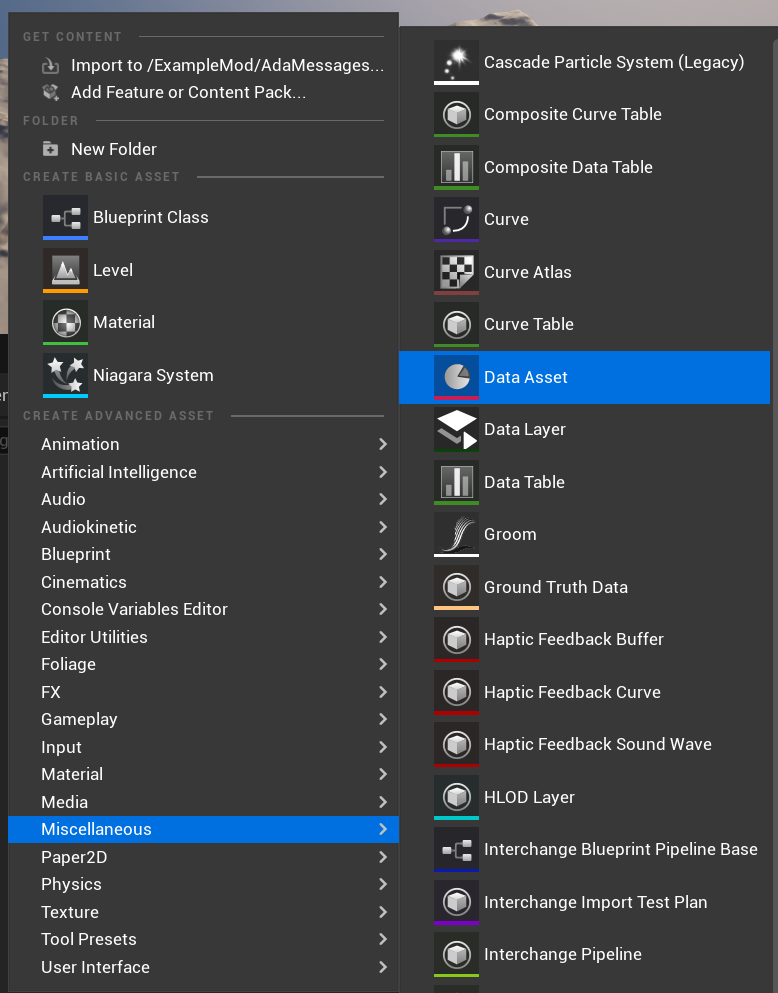
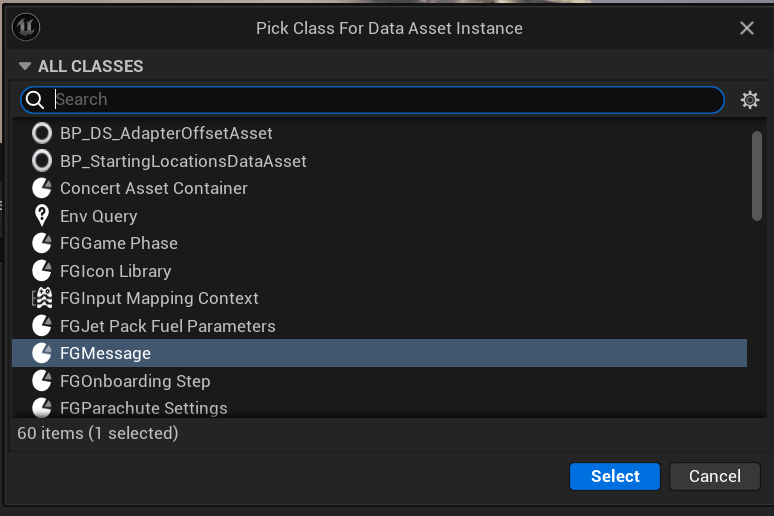
The name of the new data asset can be anything, but the following naming convention is strongly suggested:
MSG_<ModName>_Tier<TierNumber>-<MilestoneName>For example:
MSG_ExampleMod_Tier1-ExampleMilestoneThis will refer to the example mods schematic for tier 1 and the first schematic. This is optional but will help you distinguish each milestone if you have lots of ADA messages.
|
When the game loads it will look for all data assets with the class of FGMessage and load these automatically. There is no requirement to manually register these data assets. |
Setting up the Email Message
As part of the new message data asset this will also create a new email that can be viewed in the Inbox window in game.
This is the first stage of setting up the Data Asset by setting the Title and Message variables:

Setting Up Subtitles
If your ADA speak is quite long then you will need to split this into multiple subtiles. This is because the text will not fit in the ADA popup widget.
This can be done by adding a new Array element to the mSubtitles variable.
Each element in the array should have Subtitle Sender Class and Time Stamp
-
Subtitle - This is the text you want to show in the ADA popup message
-
Sender Class - This is the class of the Sender aka ADA or Alien Message
-
Time Stamp - This is the Time Stamp when the message should be sent. Correlates to the audio message timestamp if there is pauses.
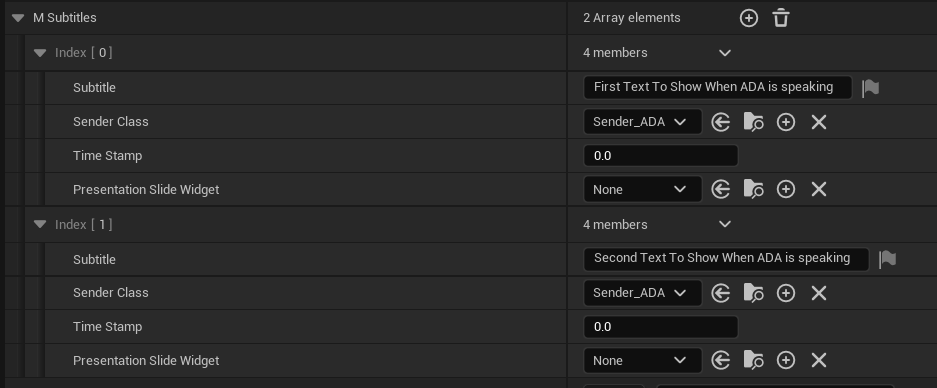
Setting the voice over requires a Wwise Audio Event and can be set in the data asset.

Setting up the Trigger
The trigger is automatically registered when the game is loaded, you just need to populate the trigger settings in the data asset.
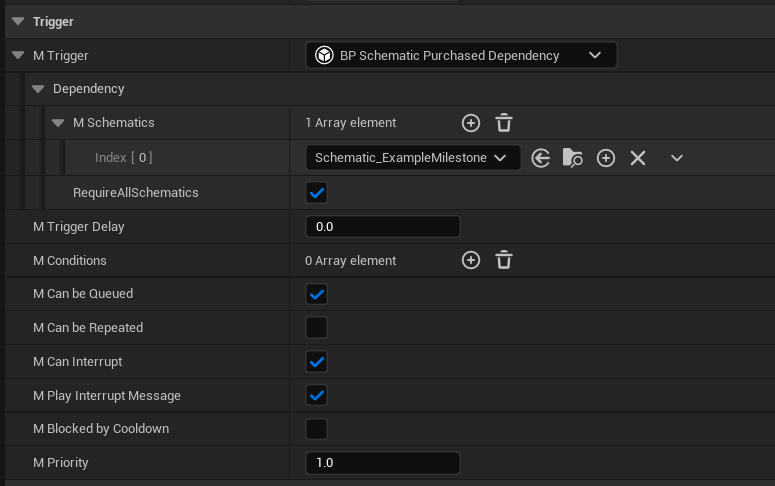
For messages triggered by schematics,
set the Trigger Dependency to BP Schematic Purchased Dependency
and configure the dependencies according to what schematic should trigger the message.
Additional trigger settings:
-
Can Be Queued - This setting is for if another ada message is being played then it will wait for it complete.
-
Can Be Repeated - This setting is for if the ada message can be repeated.
-
Can Interupt - Setting for if another lower priority message is playing then interupt it.
-
Play Interupt Message - This setting will first play the default interupt message then play our message.
-
Blocked By Cooldown - Message will not play if in the message cooldown. Generally don’t check this.
-
Priority - The priority of this message - suggested baseline value of 1.
Generating ADA Audio
All voice lines spoken by ADA (and the ????) are generated using Google’s Text-to-Speech API
with the en-US-Wavenet-C voicebank.
The additional affects applied to the ???? voice are not currently known by the community.
It was previously possible to try out on the Google Cloud TTS demo website using the following settings, but they have since removed it from the list.
-
Voice type:
WaveNet -
Voice name:
en-US-Wavenet-C -
Pitch:
-1.2
The community is not currently aware of a place to use the en-US-Wavenet-C voicebank for free,
however, some similar alternatives are known:
-
The TTSFree website allows generating audio using
en-US-Standard-Cvoicebank, which is similar but has clearly audible differences. -
Nightingale Text to Speech Demo claims to allows generating audio using
en-US-Wavenet-C, but it seems to be usingen-US-Standard-Cinstead. -
You can set up a paid Google Cloud account and use its APIs to generate Wavenet C audio
You may need to change the text of what the TTS is saying to not match what the captions are when saying certain words. For example, to have it pronounce FICSIT correctly, use the word 'fixit'
It is strongly suggested that you keep the text you fed to the TTS on hand so you can re-record lines later if needed or figure out how you got it to say a specific word in the past.
Importing ADA Audio to the Editor
Message data assets reference the audio to play via the mAudioEvent field that takes an Audiokinetic Event.
Importing audio and creating Audiokinetic Events is done through Wwise,
the process of which is documented on the Audio page.