Blueprint Hooking System
SML3.11 introduces a new Blueprint Hooking system that allows modifying the behavior of existing Blueprint functions via custom code. Your code can be run before or after the original function and can modify the function’s inputs, return values, or cancel its execution. It can also replace individual statements or expression within the function logic.
Blueprint Hooks are created as blueprint assets and have full knowledge of blueprint asset structures and function signatures.
|
Hooking of C++-implemented functions is covered on the Native Hooking page. |
A single Blueprint Hook asset can contain multiple hooks on any number of classes, enabling you to organize your hooks as you see fit.
Creating a Hook Blueprint
Within the Unreal Editor, create a new Blueprint of the type "Blueprint Hook"
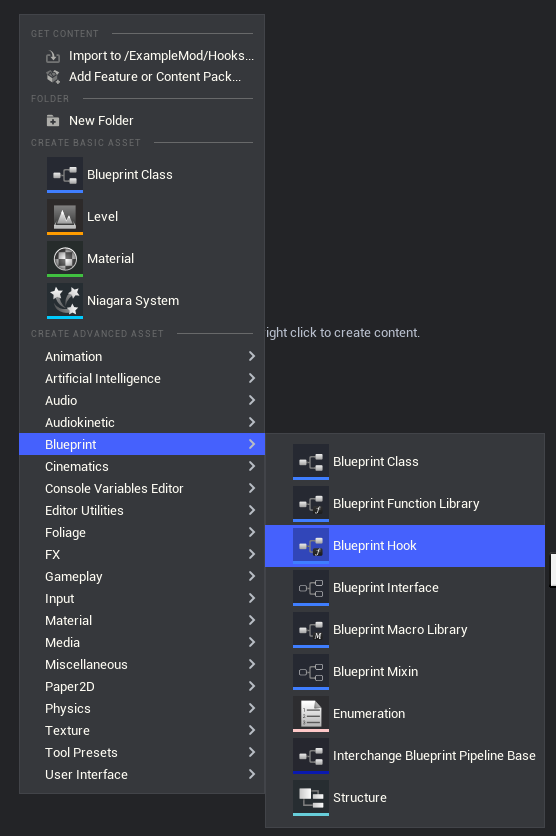
The suggested asset naming format is Hook_Purpose_ModReference.
The Hook Graph
Blueprint Hooks offer a new graph type called the "Hook Graph". The Hook Graph is a specialized graph that allows you to define hooks via Target Specifier and Hook nodes.
Click the button in the editor’s top bar to open it as a dockable window. If the button is greyed out, it means you already have the window open.
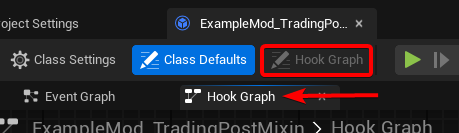
Creating Hook Graph Nodes
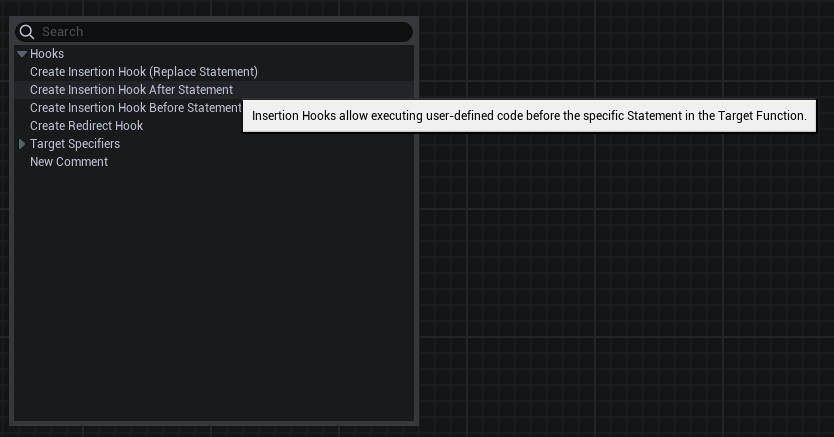
As with normal blueprint graphs, right clicking on empty space opens a prompt to create new nodes. Each node has an on-hover tooltip that explains what it does.
Comments
Comments are invaluable for explaining the purpose of a hook and grouping multiple hooks together.
Comments can be created via the "New Comment" node, the "C" hotkey does not work. All hook graph nodes also support Unreal’s comment bubble in the top left corner.
Hooks
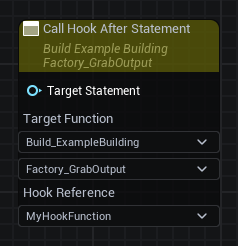
Hook nodes are used to specify what class' function you are hooking, when the hook is executed, and what custom function to call.
The following hook types are available:
-
Insertion Hook - Will resolve to the statement if targeting an expression
-
Before
-
Replace
-
After
-
-
Redirect Hook
Fill out the drop-downs to specify what class’s function you are hooking.
The editor Details pane allows switching between Insertion hook types and applying an inline Target Selector (called Target Selection Mode) for convenience. Compile the hook asset to visually apply any changes made to hook type.
Target Specifiers
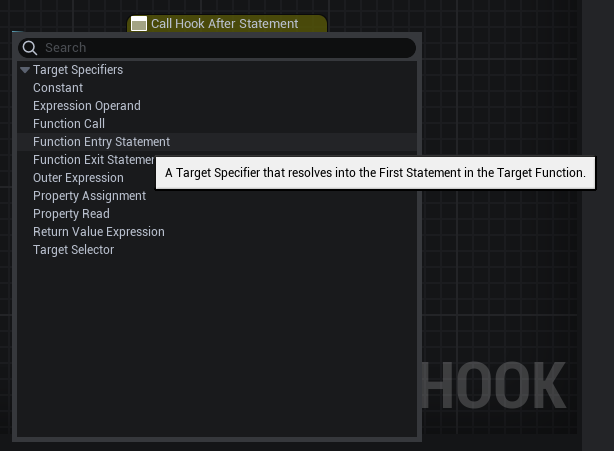
Target Specifier nodes connect to the "Target Statement" pin on hook nodes. They are used to specify which statements or expressions to match in the hooked function. Some specifiers require another specifier chained as input.
The following target specifiers are available:
-
Constant (can choose type and value)
-
Experssion Operand (takes another specifier as input)
-
Function Call
-
Function Entry Statement
-
Function Exit Statement
-
Outer Expression (takes another specifier as input)
-
Property Assignment
-
Property Read
-
Return Value Experssion
-
Target Selector (first/single/all/stuff) (takes another specifier as input)
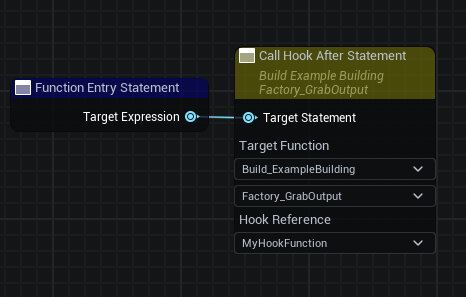
Hook Implementation Function
The code executed by a hook is defined in functions within the Hook Blueprint. The "Hook Implementation" option on hook nodes determines what function is invoked by a hook node.
Parameters
The parameters on the hook implementation function are populated by the hooking system based on the target function’s parameters, target class, and type of hook.
Parameters can be any variable that is available in the hooked function’s context that the hook might want to read/write. A wider type can be used unless the parameter is set to Pass-by-Reference (By Ref). For example, a real value float could be converted to a double parameter, or a real value of a specific object type could be converted to a general "Object" parameter.
If a parameter is passed By Ref, the type must exactly match, and no automatic type conversion is ever performed. By Ref parameters can be modified to change the mapped variable’s value in the hooked function.
Parameters are mapped to function variables by naming the parameter exactly the same thing as the variable.
-
Global Variables - on the object instance (the
Target, see below) -
Local Variables - function inputs, function locals, and function temps (which you can check for in a BP code dump, either via the
-DumpBlueprintPatchingResultslaunch argument which generates pseudocode, or in FModel which generates a json very similar to the asset dump)
In addition, the following special hooking arguments are available:
-
Target- resolves to the object instance the hooked function was running on. -
TargetReturnValue- resolves to the hooked function’s ReturnValue. -
HookTarget- only for insertion hooks. Resolves to the expression the hook was pointing to, if it wasn’t pointing to a statement. -
AssignmentTarget- only for insertion hooks on assignment statements. Resolves to the variable on the left side of an assignment statement. -
OriginalValue- required for redirect hooks. Resolves to the original value (replacing an expression inside a statement, rather than an insert hook which goes before/replace/after a statement).
All parameters are optional, except OriginalValue for redirect hooks.
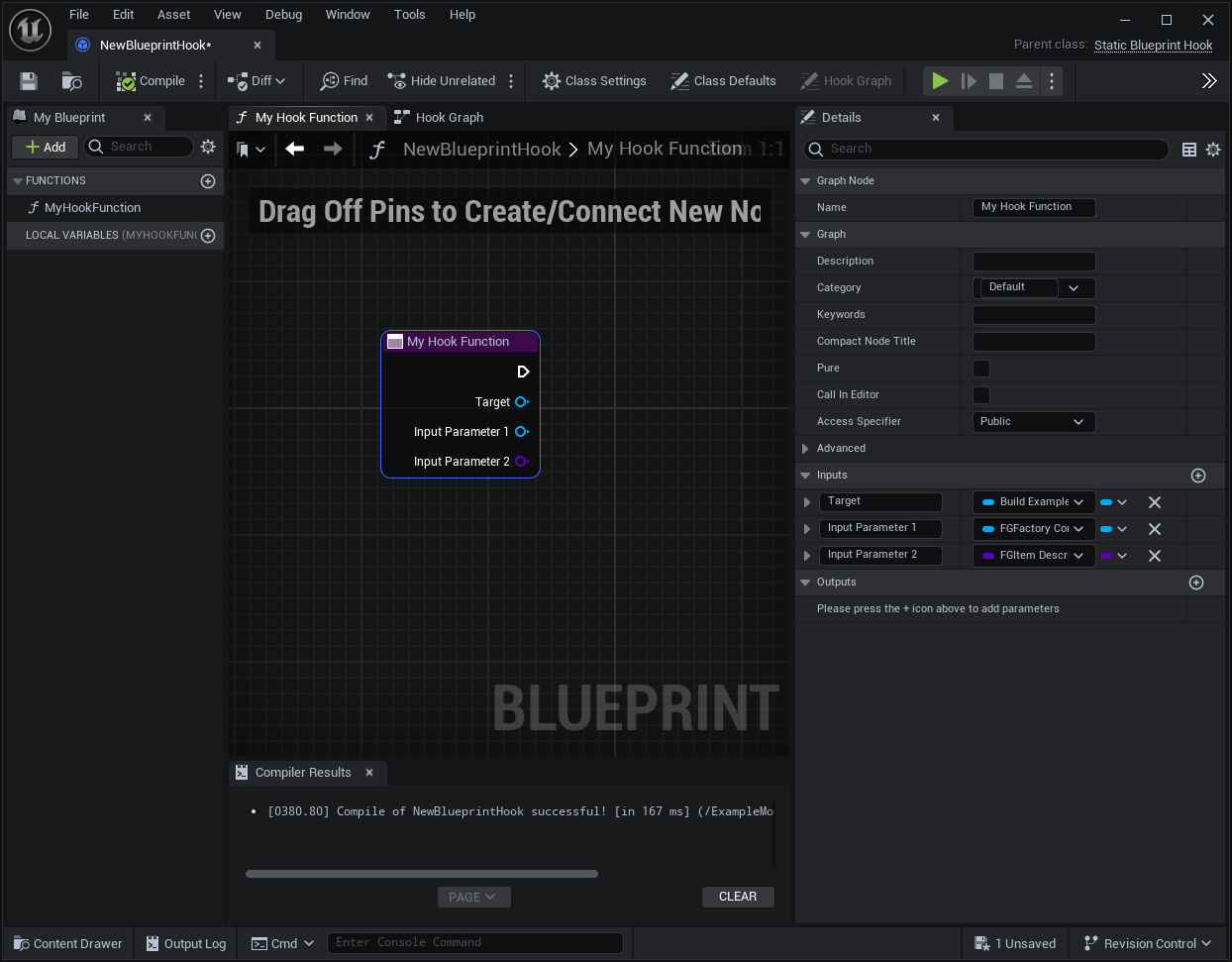
Return Values
Insertion hooks can optionally return a boolean named ReturnValue
to control whether the hooked function should continue execution (True)
or jump to the return statement, effectively canceling the function and skipping any other hooks on the statement (False).
If this is not present, execution will continue by default.
Redirect hooks must return a value of the same type as the statement being replaced.
Registering the Hook
Hook assets must be registered in a Game Instance Module to be applied in-game. Create a Mod Game Instance Module if you don’t already have one and add your new hook to the "Blueprint Hooks" array.

Troubleshooting
If your hooks aren’t triggering as expected,
check your logs for messages in the LogBlueprintHookingCodeGen and LogBlueprintHookManager categories.
A failure to attach a hook will produce a message and usually also the blueprint bytecode.
Advanced Functionality
Modify Function Arguments
You can modify the arguments the hooked function receives by using a Before Hook targeting Function Entry Statement. Add the parameter you want to modify as a By-Ref parameter on your hook function. The initial value can be accessed via the parameter and modified by a Set By Ref node.
Cancel Hooked Function Execution
Insertion hooks can conditionally cancel further execution of the function they are hooking. Be careful exactly which statement you are hooking, as you don’t want to accidentally run more of the target function’s code than you intended.
To cancel execution, the hook implementation function should return a boolean ReturnValue of False.
If you intend to cancel execution just based off of input parameters, use a Before hook on the Function Entry Statement expression.
Limitations and Workarounds
Event Graph Nodes
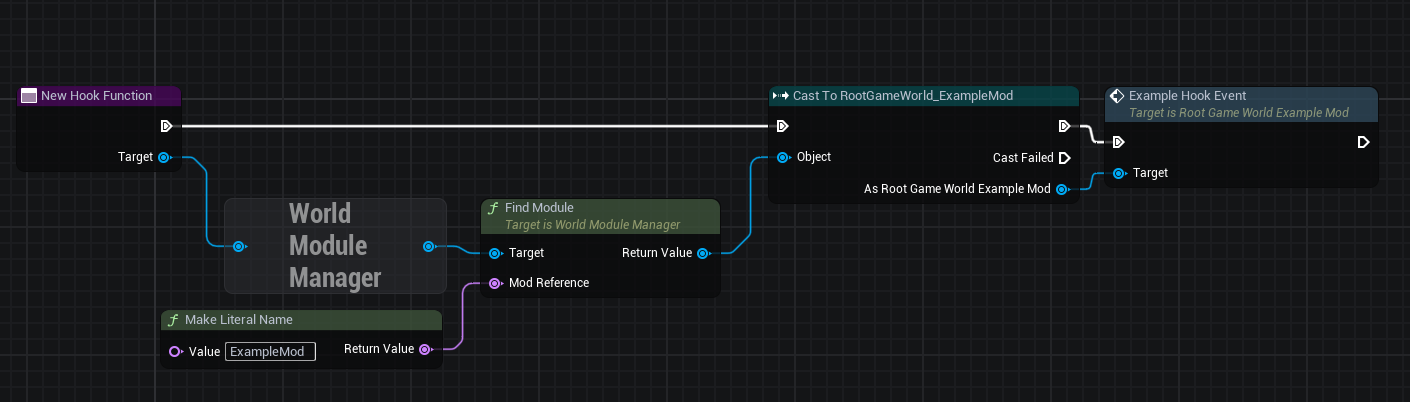
Because Blueprint Hook implementations are functions, some nodes you may be used to from Event Graphs are not available, such as Latent Action nodes like Delay.
To work around this, implement your logic in an Event Graph somewhere else, such as a Mod Subsystem or your Mod Game World Module, then call that event from the Hook Function.
Unregistering Blueprint Hooks
Once you have hooked a blueprint function, there is currently no way to unhook it without fully exiting Satisfactory. This is why blueprint hooks are registered in a Game Instance Module.
You can work around this by having your hook code check a flag in a mod subsystem or your game instance module to determine if the hook should execute.
Hooking and Dedicated Servers
Some blueprints (like UI blueprints) do not exist in the dedicated server build.
If your mod attempts to hook such a blueprint in a dedicated server, it will log an error message.
You can use the global function IsRunningDedicatedServer() to skip hooking to avoid this error.
Viewing Blueprint Function Implementations
Understanding what base-game blueprint functions do can be troublesome as we don’t have their source code and the starter project only contains placeholders of blueprint assets.
To assist with this process, SML implements the -DumpBlueprintPatchingResults command line argument.
When the game is launched with this argument,
SML will dump the bytecode of all blueprint hooked functions to the log in a relatively human-readable format.
Note that it is also possible to use FModel to dump an asset as JSON and view the blueprint bytecode in a less-readable format.
Examples
Check out ExampleMod, SML, and the Open Source Examples page for examples of existing hook blueprints.
Blueprint Hooking from C++
It is not currently possible to hook blueprint functions from C++ code using SML’s systems.
Previous versions of SML allowed hooking blueprint functions from C++ code, but because the C++ side is unaware of the structure of assets defined on the blueprint side, these hooks were always in a messy and brittle state of requiring lots of reflection and hardcoded assumptions to work. The only way to mitigate this brittleness was to have the hook call a blueprint-implemented function. The modern system removes the middleman by having blueprint hooks defined and implemented on the asset side, giving them full knowledge of asset structure.
If you’d like to implement the code your hooks run in C++, write the code in a blueprint function library or similar and call the functions from the hook blueprint.