Mod Subsystems
|
If you’re looking for the subsystems that SML provides by default, check out the Registry page. |
Subsystems are actors that exist only once in the world (similar to Singletons, but not quite) as an instance general manager. These subsystems are accessible from anywhere you have a world context available (f.e. actors).
Subsystems allow you to implement custom game state information, for example, that you want to have saved to the save file, or when you want to manage multiple actors or some system from one central point.
For example, the mod Light It Up uses subsystems to create a lamp group system. With this system, every lamp can get information about the current group settings without storing that data again in each lamp instance.
Subsystems can exist on host, client, or both sides of a multiplayer game, possibly replicated, depending on their Replication Policy setting.
Defining a Mod Subsystem
To define a new Mod Subsystem, create a new class that inherits from AModSubsystem.
|
If you’re implementing a subsystem in C++ and you override BeginPlay or EndPlay, be sure to call the super functions, or the subsystem will not be handled correctly! |
Hybrid Subsystems
Subsystems can be a convenient place to implement hybrid Blueprint and C++ functionality
since they can be easily retrieved from anywhere with world context.
To do this, define your subsystem in C++ with UCLASS(Abstract, Blueprintable)
then create a Blueprint child of that class in the Unreal editor.
Name the blueprint class BP_YourCppSubsystemName to follow the convention used by the base game.
Only the blueprint child class should be listed in the Mod Subsystems array of a Game World Module.
The following UFUNCTION specifiers are useful for hybrid subsystems:
-
Implementing functions in C++ that can be called from Blueprints:
BlueprintCallable,BlueprintNativeEvent -
Implementing functions in Blueprints that can be called from C++:
BlueprintImplementableEvent,BlueprintNativeEvent
Replication Policy
A subsystem’s replication policy determines which side(s) the subsystem will exist on in multiplayer and if data will be shared between the server and clients' instances of the subsystem.
Subsystems have the SpawnOnServer replication policy by default,
meaninging clients do not have an instance of the subsystem.
If this is not the desired behavior,
review the table below to find the replication policy that best suits your needs,
then change it in the Class Defaults (Blueprint) or constructor (C++).
| Exists in Singleplayer | Exists on Host-and-play hosts | Exists on Dedicated Servers | Exists on Multiplayer Clients | |
|---|---|---|---|---|
|
✔ |
✔ |
✔ |
✘ |
|
✔ |
✔ |
✔ |
✔ |
|
✔ |
✔ |
✘ |
✔ |
|
✔ |
✔ |
✔ |
✔ |
| Shares data between host and client instance? | |
|---|---|
|
✘ - There is no client side to share data with |
|
✔ - The server has network ownership of the actor and replicates it to clients |
|
✘ - Either there is no server side to share data with (dedicated servers) or the server and client sides do not communicate (host and play) |
|
✘ - The server and client sides do not communicate |
Registering a Subsystem
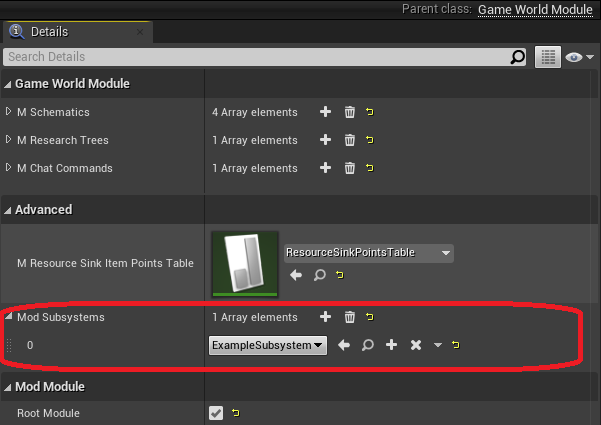
To register a subsystem, add it to the Mod Subsystems array of a
Game World Module.
Spawning a Subsystem
As long as you have correctly registered the subsystem, there is no need to for you to spawn its actor - SML will take care of spawning it for you. Subsystems are spawned early in the Construction phase and their Begin Play method is called as part of the Initialization phase.
If the actor doesn’t seem to be spawning for some reason, make sure that you have correctly configured its Replication Policy.
Referencing a Subsystem
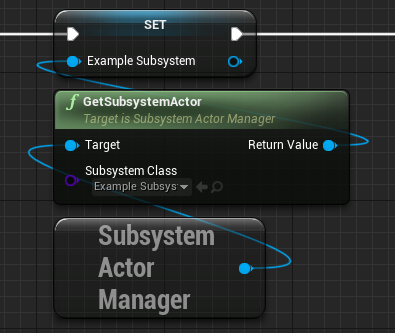
Subsystems are held by the SubsystemActorManager that can be obtained using the GetSubsystemActorManager function.
Use the GetSubsystemActor function on the manager to get a reference to a subsystem.
Consider checking if the retrieved subsystem is valid before trying to do anything with it using an IsValid node.
From Blueprints
-
The first parameter of the function is a reference to a
SubsystemActorManageracquired using theGetSubsystemActorManagerfunction. -
The second parameter is the class of the subsystem actor to retrieve.
From C++
The SubsystemActorManager is a UWorldSubsystem and as such can be accessed from the world context via Unreal’s getter. GetSubsystemActor can be used with a generic type parameter to retrieve the subsystem actor of the specified class.
// Requires something with world context, for example, an actor
UWorld* WorldObject = GEngine->GetWorldFromContextObjectChecked(WorldContext);
USubsystemActorManager* SubsystemActorManager = WorldObject->GetSubsystem<USubsystemActorManager>();
check(SubsystemActorManager);

AYourSubsystem* subsystem = SubsystemActorManager->GetSubsystemActor<AYourSubsystem>()
Make sure to only use subsystems from the game thread.
Wait for Subsystem
Although subsystems spawn relatively early in the game world loading sequence, sometimes code that wants to use them may end up triggering sooner. This can happen in multiplayer when a subsystem has not replicated to the client yet, or on hosts when an Actor Mixin is triggering code on Begin Play.
In these situations, you can use the Wait for Subsystem node in Blueprint event graphs to wait until the subsystem is available.