Migrating SCS Hooks to Mixins
|
Before following this guide you should read the Actor Mixins page to get an overview of the new system and how to create Mixins using it. |
Migrating from a SCS Hook to a Mixin is easy because you already have all the information you need in your Mod Game Instance Module.
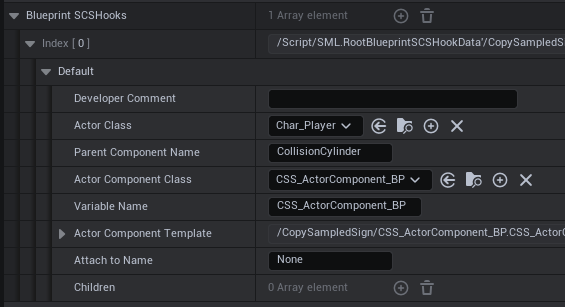
New SCS Hooks cannot be made, but old ones will remain so you can use them when migrating to Mixins.
From this old information we get:
-
Actor being attached to
-
Parent Component
-
Component with your logic
Now follow the instruction from the Actor Mixins page to create a new Mixin. When prompted for the Mixin Target use the one from the "Actor Class" in your old SCS Hook:
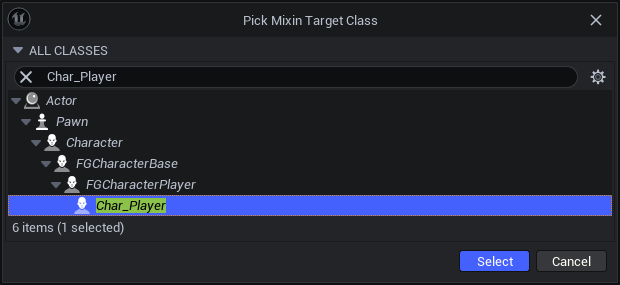
From here you have two options:
-
Use the Mixin to attach your existing component to the actor. In most cases this will be a drop-in replacement for your old SCS Hook, but be aware that the mixin can spawn your component earlier in the loading sequence than the SCS Hook did in the past. This is useful if you want to keep the logic in your existing component and just attach it to the actor. Make sure to copy any of the settings from your SCS hooks' actor component template(s) to the ones you add via the Mixin, assuming your editor even displays the template (a now-irrelevant bug prevented the option from being presented in most circumstances)
-
Migrate the logic from the component your SCS Hook used to spawn into the Mixin. Depending on the tasks you need to perform, a component may be unnecessary and you can just write the logic directly to the Mixin.
|
Don’t forget to register your new Mixin as described in the Actor Mixins page. |