Configurations
Configuration for Ficsit Remote Monitoring
As of Satisfactory 1.2, Ficsit Remote Monitoring has been re-written to use the FGUserSettings system for configuration. This allows for easier configuration in-game.
The legacy configuration files are still present for reference, but are not used by the mod anymore. The legacy configuration files are located in the FactoryGame/Configs/FicsitRemoteMonitoring folder, and are named SerialDevices.cfg, DiscIT.cfg, MonitoringConfig.cfg, and WebServer.cfg.
These files are not used by the mod anymore, but are left for reference for anyone who wants to see how the mod was configured in the past or wants to use them to migrate to the new system. A migration process was not added due to concerns about potential issues with parsing old config files and the fact that the new system is more user-friendly and easier to configure in-game.
If you are having issues connecting to the Web Server or Serial Device, please update your configuration to the new system. Refer to the old/legacy configuration files located in the FactoryGame/Configs/FicsitRemoteMonitoring folder for Ficsit Remote Monitoring.
|
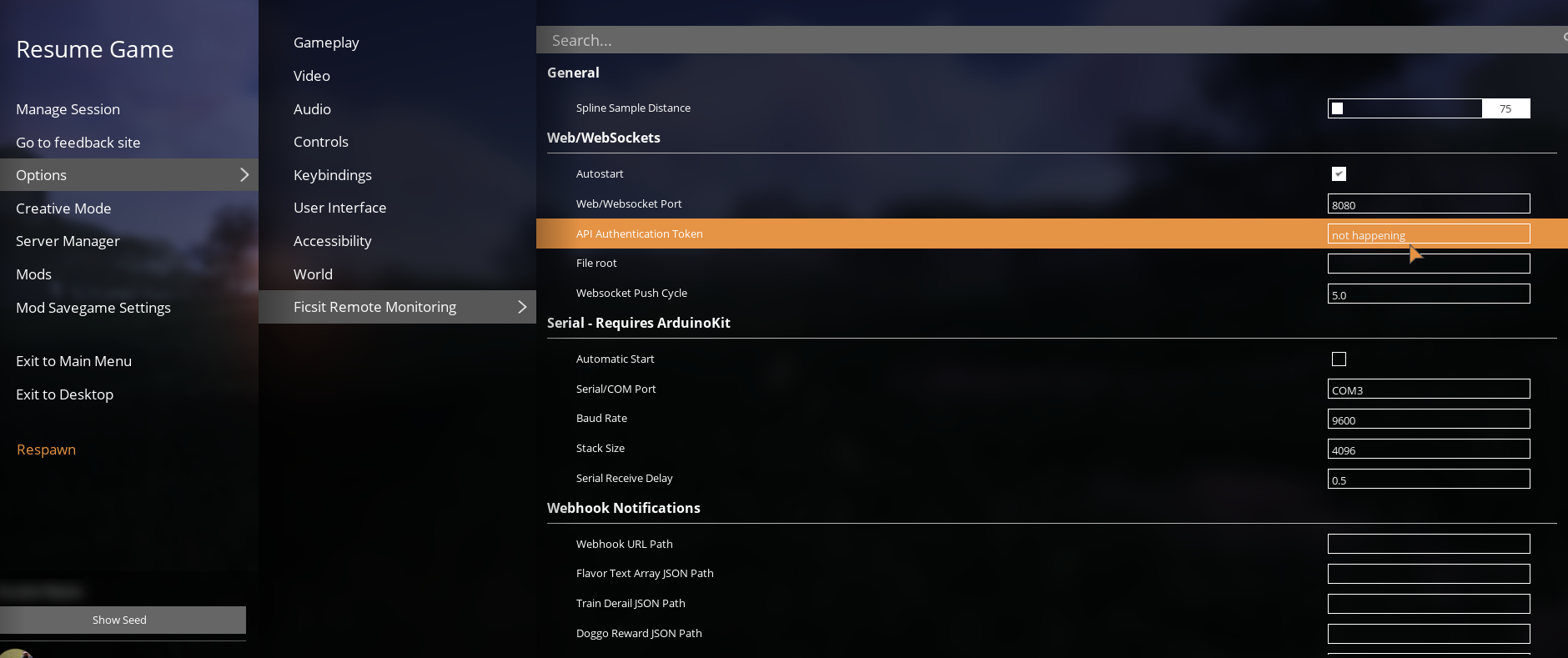
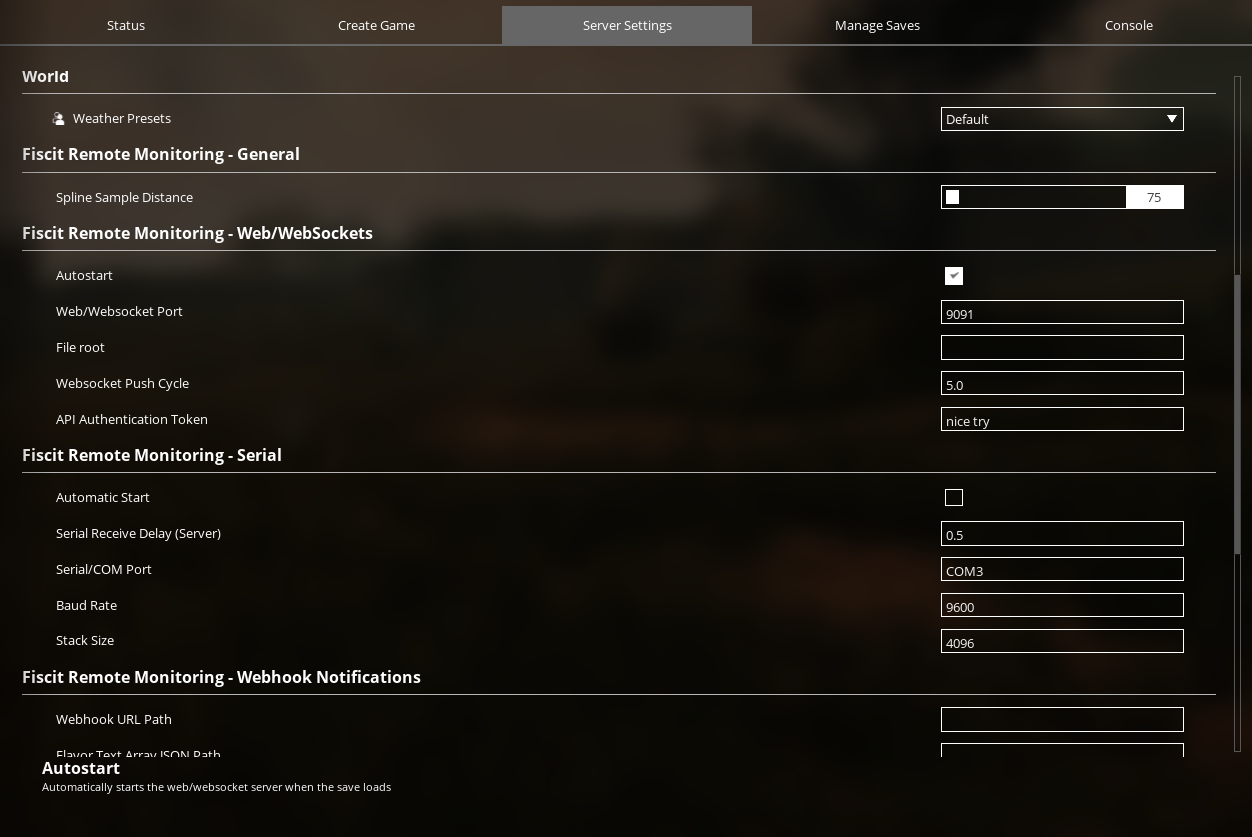
Please note that there is a difference between the Single Player/Host Session configuration and the Dedicated Server configuration. The Single Player/Host Session configuration is used for single player games and when hosting a multiplayer session, while the Dedicated Server configuration is used for dedicated servers. Make sure to update the correct configuration based on your use case as using the Single Player/Host Session configuration for a dedicated server or vice versa may lead to unexpected behavior or issues with the mod. A fix is in the works to resolve the confusion between the two configurations, but in the meantime, please make sure to update the correct configuration based on your use case. |
Single Player/Host Session Config Location
Dedicated Server Config Location
NOTE:
The configuration values are stored in the GameUserSettings.ini file, which can be found in the following locations:
- Single Player/Host Session:
%localappdata%/FactoryGame/Saved/Config/Windows/GameUserSettings.ini
- Windows Dedicated Server:
<Server Install Location>/FactoryGame/Saved/Config/WindowsServer/GameUserSettings.ini
- Linux Dedicated Server:
<Server Install Location>/FactoryGame/Saved/Config/LinuxServer/GameUserSettings.ini
The base configuration formats for Ficsit Remote Monitoring are the same for both Single Player/Host Session and Dedicated Server, but the configuration key prefixes are different.
Single Player/Host Session configuration keys are prefixed with FicsitRemoteMonitoring while Dedicated Server configuration keys are prefixed with FicsitRemoteMonitoring.Server.
Example: JSON Debug Mode
Single Player/Host Session:
FicsitRemoteMonitoring.Debug.JSONDebug
Dedicated Server:
FicsitRemoteMonitoring.Server.Debug.JSONDebug
The configurations listed below will display their unique configuration key. Ensure you use the correct configuration key prefix for both Single Player/Host Session and Dedicated Server to avoid confusion. If your configuration is not valid, when the game saves the configuration, it will remove them. Always double check your configuration keys and values to ensure they are correct.
=== General Configurations: === |
|||
Key |
Type |
Configuration |
Description |
<prefix>.General.SplineSampleDistance |
mFloatValue |
Spline Sample Distance |
Distance along spline to measure for each spline point for getTrainRails, getBelts, getPipes, etc Lower numbers will create more data points for Spline JSON Objects, but potentially hurts performance. Recommendations are about 50-100 for Game-world accuracy or fine minimap, and 200-1000 for Low-res preview or performance focused use cases. |
=== Debug Configurations: === |
|||
Key |
Type |
Configuration |
Description |
<prefix>.Debug.JSONDebug |
mIntValue |
JSON Debug Mode |
If False, removes the unnecessary white spaces and line breaks, shortens and reduces amount needed to transmit. If True, JSON becomes more human readable. |
=== HTTP and Websocket Configurations: === |
|||
Key |
Type |
Configuration |
Description |
<prefix>.uWS.Autostart |
mIntValue |
Autostart Web Server |
True = Autostarts Web Server at Game Start/Load |
<prefix>.uWS.Port |
mStringValue |
Web Server Port |
TCP Port for Web Server, Default: 8080 |
<prefix>.uWS.Root |
mStringValue |
File Root Location |
File location of web root, Default: <empty> Leave blank or "" for default location. |
<prefix>.uWS.AuthenticationToken |
mStringValue |
API Authentication Token |
Auto-generated token that can also be found in the logs at startup. This is used to authenticate certain API requests to prevent unauthorized access. If left blank, it will auto-generate a token at startup. |
<prefix>.uWS.PushCycle |
mStringValue |
Websocket Push Cycle |
Push cycle for WebSocket updates, Default: 5.0 |
=== Serial/RS232 Configurations: === |
|||
Key |
Type |
Configuration |
Description |
<prefix>.Serial.Port |
mStringValue |
Serial Port |
Serial/RS232 Port (Requires ArduinoKit). Changes from UE4Duino, you must specify the device name (i.e. COM3) Linux/Mac operations have not been explored at this time to document, but are supported. |
<prefix>.Serial.BaudRate |
mStringValue |
Baud Rate |
Serial/RS232 Baud Rate (Requires ArduinoKit) |
Serial.Autostart |
mIntValue |
Autostart Serial Device |
True = Starts serial communication at startup (Requires ArduinoKit) |
<prefix>.Serial.TickDelay |
mStringValue |
Serial Tick Delay |
Delay between updates (in seconds) to serial device. This is only used for cases with Auto_Serial. (Requires ArduinoKit) |
<prefix>.Serial.StackSize |
mStringValue |
Serial Stack Size |
Maximum buffer size (Requires ArduinoKit) |
=== Webhook Notifications: === |
|||
Key |
Type |
Configuration |
Description |
<prefix>.DiscIT.URL |
mStringValue |
Webhook URL Path |
URL Path to send Webhook Notifications |
<prefix>.DiscIT.DerailJSON |
mStringValue |
Train Derailment JSON File |
Absolute path of Webhook JSON File. If Blank/"", then uses the default. |
<prefix>.DiscIT.OutageJSON |
mStringValue |
Power Outage JSON File |
Absolute path of Webhook JSON File. If Blank/"", then uses the default. |
<prefix>.DiscIT.PwrUPSJSON |
mStringValue |
Battery Notification JSON File |
Absolute path of Webhook JSON File. If Blank/"", then uses the default. |
<prefix>.DiscIT.Battery |
mStringValue |
Battery Notification Levels |
Array of float values to trigger Battery Notification webhook at certain Battery Levels (in %), expects comma separated values, i.e. "20,40,60,80" |
<prefix>.DiscIT.PlayerOnline |
mStringValue |
Player Online JSON File |
Absolute path of Webhook JSON File. If Blank/"", then uses the default. |
<prefix>.DiscIT.PlayerOffline |
mStringValue |
Player Offline JSON File |
Absolute path of Webhook JSON File. If Blank/"", then uses the default. |
<prefix>.DiscIT.ResearchJSON |
mStringValue |
MileStone/MAM JSON File |
Absolute path of Webhook JSON File. If Blank/"", then uses the default. |
<prefix>.DiscIT.HardDriveJSON |
mStringValue |
Hard Drive JSON File |
Absolute path of Webhook JSON File. If Blank/"", then uses the default. |
<prefix>.DiscIT.FlavorTextJSON |
mStringValue |
Flavor Text JSON File |
Absolute path of Webhook JSON File. If Blank/"", then uses the default. |
<prefix>.DiscIT.Doggo |
mStringValue |
Doggo JSON File |
Absolute path of Webhook JSON File. If Blank/"", then uses the default. |
<prefix>.DiscIT.TrainErrorJSON |
mStringValue |
Train Error JSON File |
Absolute path of Webhook JSON File. If Blank/"", then uses the default. |