Hooking
Hooking is a C++ exclusive feature of SML that allows you to attach a custom function body to an existing function.
All C/C++ functioning hooking stuff can be found in #include "Patching/NativeHookManager.h".
All Blueprint function hook stuff can be found in #include "Patching/BlueprintHookManager.h".
Background Information
The hooking system SML is using is just C / C++ function hooking, as Unreal Engine is C++. This system can theoretically be used on any executable, but you need to know the location of functions in memory, which is difficult. For general C++ executables, and most UE games, you only have a .exe, which provides no information about where functions are located, so to figure that out you need very good reverse engineering skills, and it needs to be done on an exe-by-exe basis, so if the game updates, everything breaks.
What’s different about Satisfactory is that it provides PDBs, which normally are used to determine the call stack when a crash happens, but they can also be used in the other direction: to find a function address based on the name.
Finding a function address based on the name is the technique that SML v1 used to implement hooking. The trouble there is that many functions may be stripped, or inlined, which makes C++ modding in general harder, but also complicates hooking, as methods might suddenly disappear and be embedded into the place they are called from.
At our request, Coffee Stain enabled Modular Build in Update 4, which means each Unreal Engine module is a dll on its own. This means that all functions are exported, so their address can be natively found by the linker, and also that no function can be inlined. Modular builds also enable the native Unreal Engine mod support (i.e., loading mod plugins from the Mods folder).
C++ Function Hooks
C++ hooks, also known as native hooks, allow changing the behavior of game and engine functions implemented in C++ without modifying their source code.
SML’s hooking interface provides distinct 3 ways of hooking functions, each of which have two types of call order.
If multiple hooks are attached to the same function, these hooks will then get called in the order they were registered.
There is a normal hook that gets called before the actual function gets called.
Through this hook, you are able to prevent the final function call and you are also able to overwrite the return value.
If you cancel the execution of the final function, you can prevent the following hooks from being called.
Keep in mind that this means that another hook can prevent your hooks from being called by Satisfactory.
The normal hook’s signature is void(TCallScope<HookFuncSignature>&, hookFuncParams).
If you hook a member function, the this pointer is handled like a parameter and is the first parameter used.
As long as you don’t cancel the final function execution, or do it yourself by calling the scope object,
the final function will be implicitly called after your hook function returns.
The call scope object allows you to:
-
Cancel the final function execution (if the hook function returns void).
void hook(TCallScope<...>& Scope, class* exampleClass, int exampleArg) { Scope.Cancel(); } -
Call the next hooks and the final function within your body. Calling the scope need to have all the same parameters as the func hook signature.
void hook(TCallScope<int(int)>& Scope, class* exampleClass, int exampleArg) { // stuff before final function call int result = Scope(exampleClass, exampleArg); // call following hooks (final function might get called as long as following hooks don't cancel/overwrite it) // stuff after final function call } -
You can also override the return value before the final call (causes the final call to not occur)
void hook(TCallScope<int(int)>& Scope, class* exampleClass, int exampleArg) {
	// final function might get called
	Scope.Override(customReturnValue);
	// final function wont get called anymore
}
Since you still want to make sure your hook gets called, no care about whether the final function got called or not we introduce the "after" hooks. These hooks get all called after the normal hook calls and only allow you to read the parameters as well as the resulting return value. That means you can’t influence the final function call. Also, don’t use the TCallScope object, instead the first parameter of your hooks signature is the return value followed by the function call parameters.
void hook(int returnValue, int exampleArg) {
	// do some stuff
}
The 2 Types of Hooks
By 'hook types' we mean the different ways of attaching a hook to a function. Each attachment method works differently under the hood, and it’s important to pay attention to the key differences between the different types of hooks.
Be aware that the type of return values and parameters etc has nothing to do with each other or if it is a member function, you can use them in any way. Note that the Hook function is a std::function, which means that it can be any type a std::function can accept, such as function pointers, function pointers with bound placeholders, or even lambdas.
|
The behavior of hooks at editor time is highly unpredictable and can cause crashes. As such, you should ensure that your hooks are not applied at editor time, else you could potentially be unable to open the Unreal Editor until you edit the hook code externally. The most convenient way is to put the Using |
Type: SUBSCRIBE_METHOD
The SUBSCRIBE_METHOD-Macro attaches a hook
such that the code you pass will be called before the function executes.
If multiple mods have subscribed to the same function, the hooks will be called in the order they were registered.
Usage goes as follows:
// in target class SomeClass
public:
	int MemberFunction(int arg1);
	static void StaticFunction();

// in your code
#include "Patching/NativeHookManager.h"

void registerHooks() {
	SUBSCRIBE_METHOD(SomeClass::MemberFunction, [](auto& scope, SomeClass* self, int arg1) {
		// do some nice stuff there
	});

	SUBSCRIBE_METHOD(SomeClass::StaticFunction, [](auto& scope) {
		// do some nice stuff there
	});
}|
Hooking an overloaded function might not work as intended since the compiler has no clue what exact symbol you now want to hook.
For that, you should have a look at the |
Type: SUBSCRIBE_METHOD_VIRTUAL
The SUBSCRIBE_METHOD_VIRTUAL macro attaches the given hook to the function passed by pointer for the given class.
This hook only modifies the function that the virtual table for the given class points to. Functions in subclasses overriding the virtual function of the given class won’t be modified, but the hook will still run if the hooked function is called by the overriding implementation (i.e. "calls super"). If the overriding implementation of a subclass does not "call super", you have to hook said subclass separately. Because pure virtual functions do not have a proper function body, they cannot possibly be hooked.
Usage goes as follows:
// in target parent class SomeClass
public:
	virtual int MemberFunction(int arg1);

// in child class SomeChild that we don't want to hook
// class SomeChild : public SomeClass
public:
	virtual int MemberFunction(int arg1) override;

// in your code
#include "Patching/NativeHookManager.h"

void registerHooks() {
	SomeClass* SampleObject = GetMutableDefault<SomeClass>(); // For UObject derived classes, use SUBSCRIBE_UOBJECT_METHOD instead
	SUBSCRIBE_METHOD_VIRTUAL(SomeClass::MemberFunction, SampleObject, [](auto& scope, SomeClass* self, int arg1) {
		// do some nice stuff there
	});

	SomeClass parent;
	parent->MemberFunction(0); // hook gets called
	SomeChild c;
	c->MemberFunction(1); // hook does not get called
}
Special Cases
Depending on the type of function you are attempting to hook and what you want to do with it, you may need to make some adjustments.
Const Functions
When hooking a const function you will need to prefix the "self" pointer with const.
| Is Const? | Format |
|---|---|
Non-Const |
|
Const |
|
Hooking AFTER
For "after" hooks, add the _AFTER postfix to the macro names.
Be aware that the hook function signature changes accordingly and no longer needs the "scope".
The below examples are for non-virtual functions.
For virtual functions, use SUBSCRIBE_METHOD_VIRTUAL_AFTER instead of SUBSCRIBE_METHOD_AFTER.
| Return? | Parameters? | Format |
|---|---|---|
❌ |
❌ |
|
✔️ |
❌ |
|
❌ |
✔️ |
|
✔️ |
✔️ |
|
Blueprint Function Hooks
Blueprint function hooking works by changing the instructions of a Blueprint UFunction so that your hook gets called at a specific point in the execution of that function.
Like native hooks, you can hook before and after the function execution. Unlike native hooks, you can also hook at any top-level statement in the function if you know its original instruction index (which itself requires decompiling the function - look at DEBUG_BLUEPRINT_HOOKING in SML’s BlueprintHookManager.cpp for one way to get a JSON dump of the instructions).
|
Some blueprints (like UI blueprints) do not exist in the dedicated server build. If your mod attempts to hook such a blueprint in a dedicated server, it will crash the server. You can use the global function |
|
Once you have hooked a blueprint function, there is currently no way to unhook it without fully exiting Satisfactory. For this reason, it is recommended that you create/have a root UGameInstanceModule that installs all blueprint function hooks on game startup, usually when DispatchLifecycleEvent is first called. |
The hook function signature is void(FBlueprintHookHelper&).
This FBlueprintHookHelper structure provides ways to:
-
Access the Context object (Blueprint instance on which the function is executing).
-
Read/write variables of the Context, local variables of the hooked blueprint function (which include its Input variables), and Output variables of the function.
-
Skip from the hooked point to the end of the function’s execution (though all hooks at that location will be executed prior to this jump).
To attach a blueprint hook, you need a reference to the Blueprint class containing the function you want to hook. There are C++-only ways to do this using LoadClass, but they require hardcoding resource paths, which is not recommended. Instead, you should add these types as member variables to your UGameInstanceModule and then assign them using the picker in the Unreal Editor.
Here’s an example of getting a reference to the BPW_MapMenu class for hooking (this widget is the left-hand-side menu in the map screen of Satisfactory that lists all the map markers):
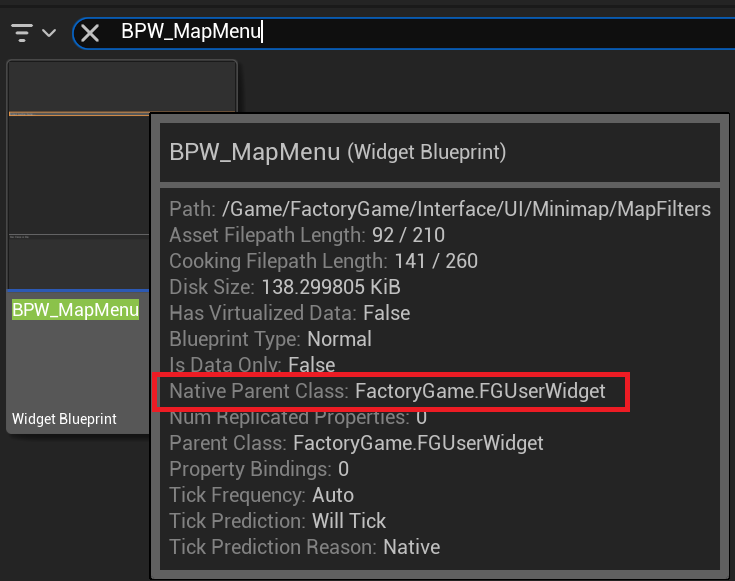
First, determine the native parent class of the widget. A quick way to see this is to find the blueprint you wish to hook in the Content Browser of the Unreal Editor and hover over it to find the Native Parent Class line:
Next, define a TSoftClassPtr property on a C++-backed Root Game Instance Module.
Use the Native Parent Class of the blueprint class you wish to hook as the generic type.
Make it an EditAnywhere UPROPERTY so it will be available in the Unreal Editor.
Optionally, assign a Category name to help organize the property if you plan to hook multiple things.
	UPROPERTY(EditAnywhere, Category = "UI Widget Types")
	TSoftClassPtr<UFGUserWidget> BPW_MapMenuClass;
Next, close the editor and rebuild the project for Development Editor, since you just changed the class and field structure of your mod. After the build finishes, reopen the editor.
If your mod doesn’t have a blueprint Root Instance Module yet, create one by adding a new blueprint to your mod that uses your C++ Root Instance Module class as its base class. If your mod already has an existing blueprint-implemented Root Instance Module, reparent it to your C++ class, or use a submodule instead (remember, there can only be one root module of each type).
Regardless, open your Root Instance Module blueprint in Unreal Editor. Find the appropriate row in the module blueprint’s Details section under the Category you used, click the dropdown, and find/select the type:

The class is now availabe to your module for hooking.
|
It is possible that a class might not be fully loaded by the game before your mod needs it.
Call |
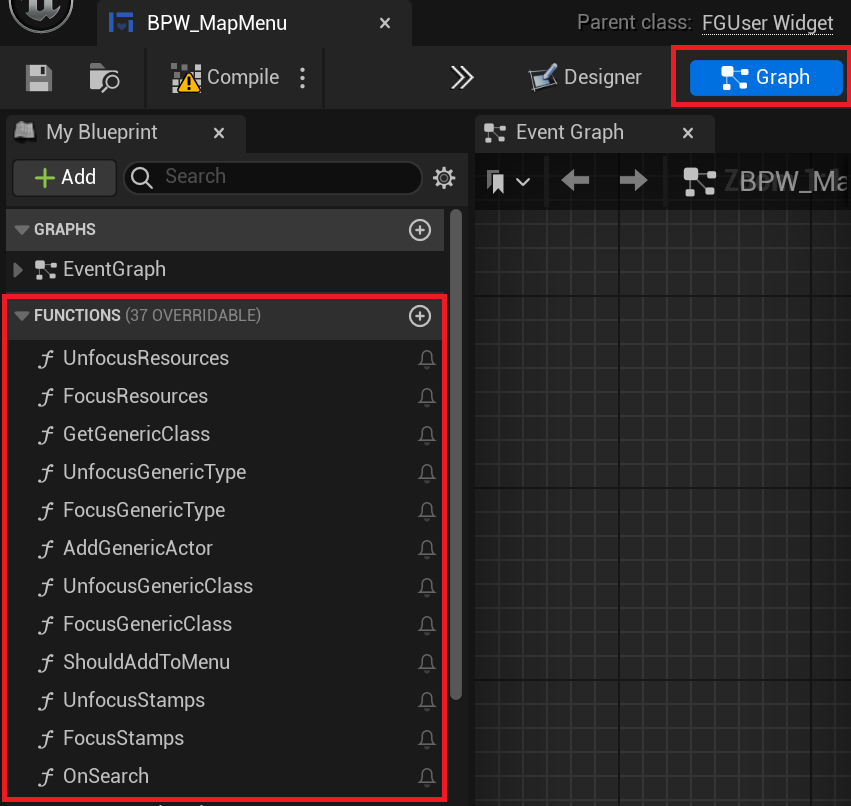
Now that we have a reference to the blueprint class, we can hook its functions. If you don’t already know the name of the blueprint function you wish to hook, these can be found by opening the blueprint in the Unreal Editor, going to the Graph view, and then viewing the FUNCTIONS accordion under the My Blueprint tab:
Now you can create the actual hook in C++. Make sure you have the proper includes:
#include "Patching/BlueprintHookManager.h"
#include "Patching/BlueprintHookHelper.h"
Get a reference to the UBlueprintHookManager like so:
UBlueprintHookManager* hookManager = GEngine->GetEngineSubsystem<UBlueprintHookManager>();|
If you attempt to get the UBlueprintHookManager extremely early in startup, the game will crash. It will be available by the time DispatchLifecycleEvent is called on your UGameInstanceModule. Remember that DispatchLifecycleEvent is called three times with three different phase values as the game initializes - be sure to only create the hooks in one of these phases (ELifecyclePhase::CONSTRUCTION should be fine). |
Hooks can be created by calling HookBlueprintFunction on the hook manager:
hookManager->HookBlueprintFunction(
	BPW_MapMenuClass->FindFunctionByName(TEXT("AddActorRepresentationToMenu")), // Will crash if you typo the function name
	[](FBlueprintHookHelper& helper) {
		// Hook code here
	},
	EPredefinedHookOffset::Start );
	// EPredefinedHookOffset::Start hooks just before the function executes.
// For a hook just before the function returns, use EPredefinedHookOffset::Return|
You can create hooks at nearly-arbitrary points in the function by passing the integer offset of the statement where you’d like to hook instead of an EPredefinedHookOffset. Only do this if you know exactly what you’re doing and why! |
FBlueprintHookHelper has all the functionality you should need if you wish to modify the state of the blueprint or function execution. To get and/or set the values of variables, use one of:
// For reading/writing variables on the blueprint that is being hooked (in the example above, this means member variables of BPW_MapMenu)
TSharedRef<FBlueprintHookVariableHelper_Context> contextHelper = helper.GetContextVariableHelper();

// For reading/writing Input variables of the function, as well as any local variables the function is using for execution (but you have to know their names by decompiling the function)
TSharedRef<FBlueprintHookVariableHelper_Local> localHelper = helper.GetLocalVariableHelper();

// For reading/writing Output variables of the function
TSharedRef<FBlueprintHookVariableHelper_Out> outHelper = helper.GetOutVariableHelper();
Check the header comments on each Get*VariableHelper method to learn which helper to use in what situation.
Here is a quick example:
TSharedRef<FBlueprintHookVariableHelper_Local> localHelper = helper.GetLocalVariableHelper();
ERepresentationType* representationType = localHelper->GetEnumVariablePtr<ERepresentationType>(TEXT("representationType"));
int* intValuePtr = localHelper->GetVariablePtr<FIntProperty>(TEXT("someIntValue"));
*intValuePtr = 42; // You can write values to variables simply by using the returned pointers
Protected/Private Function Hooking
If the function you are attempting to hook is protected or private to that specific class, you must use the friend declaration.
This also means that you can only hook this function from a class, not global scope.
For example, let’s assume you have a class called MyWatcher in a namespace called MyMod, and you wish to hook the function EnterChatMessage from AFGPlayerController class.
The suggested method of doing this is with Access Transformers. In your AccessTransformers.ini file you would create the entry:
Friend=(Class="AFGPlayerController", FriendClass="MyWatcher")Alternatively, you can edit the header files directly. This is not advisable for reasons described in more detail on the Access Transformers page.
You must first edit the FGPlayerController.h header and add the following block of code to it:
namespace MyMod
{
	class MyWatcher;
}
Then you have to add the friend declaration to the class itself, in result, it should look like this:
...

class FACTORYGAME_API AFGPlayerController : public AFGPlayerControllerBase
{
	GENERATED_BODY()
public:
	friend MyMod::MyWatcher;

...
}